Use the WordPress integration if your website is built on WordPress.

How to connect WordPress

  1. Go to Settings.
  2. Open Integrations.
  3. Choose WordPress.
  4. Click Connect.
Add your website URL: Enter your main WordPress website URL into Serpy. Add your credentials or application password: If Serpy asks for an application password:
  1. Sign in to your WordPress admin dashboard.
  2. Open Users → Profile for the user who will publish posts.
  3. Scroll to Application Passwords.
  4. Enter a name, such as Serpy publishing.
  5. Click Add Application Password.
  6. Copy the generated application password into Serpy and enter the WordPress username if requested.
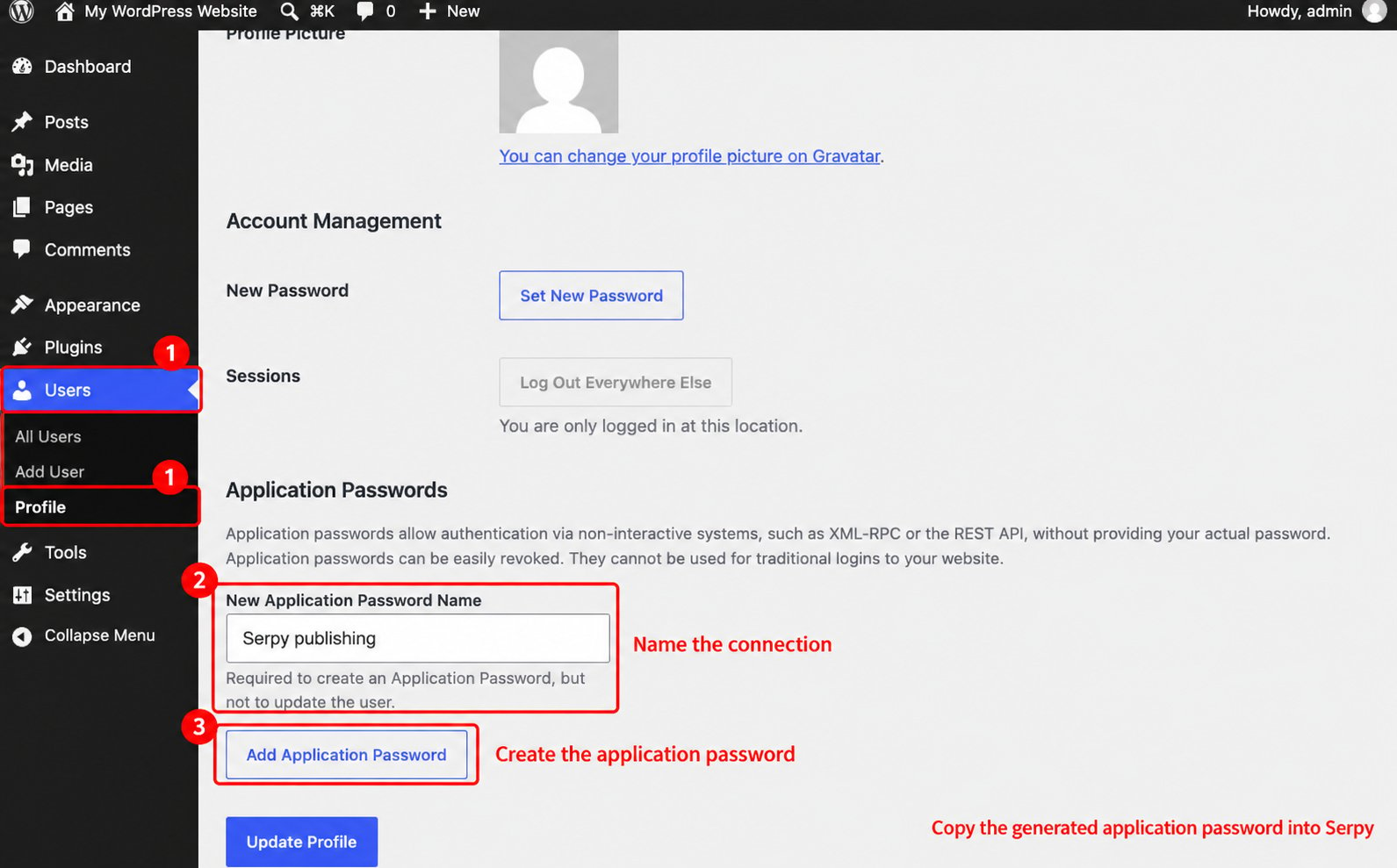
Create a WordPress application password from the user profile Save the connection and test publishing with a draft article.

Tips for WordPress

Use the main website URL, not a specific blog post URL. Make sure the WordPress user has permission to create and publish posts. If your site uses security plugins, make sure they are not blocking the connection.