> ## Documentation Index
> Fetch the complete documentation index at: https://docs.serpyseo.com/llms.txt
> Use this file to discover all available pages before exploring further.
# Connect Framer
Use the Framer integration if your website or blog is managed through Framer.
## How to connect Framer
1. Go to Settings.
2. Open Integrations.
3. Choose Framer.
**Add your Project ID:**
Your Project ID is found at the end of your URL slug when you are editing your website on framer.
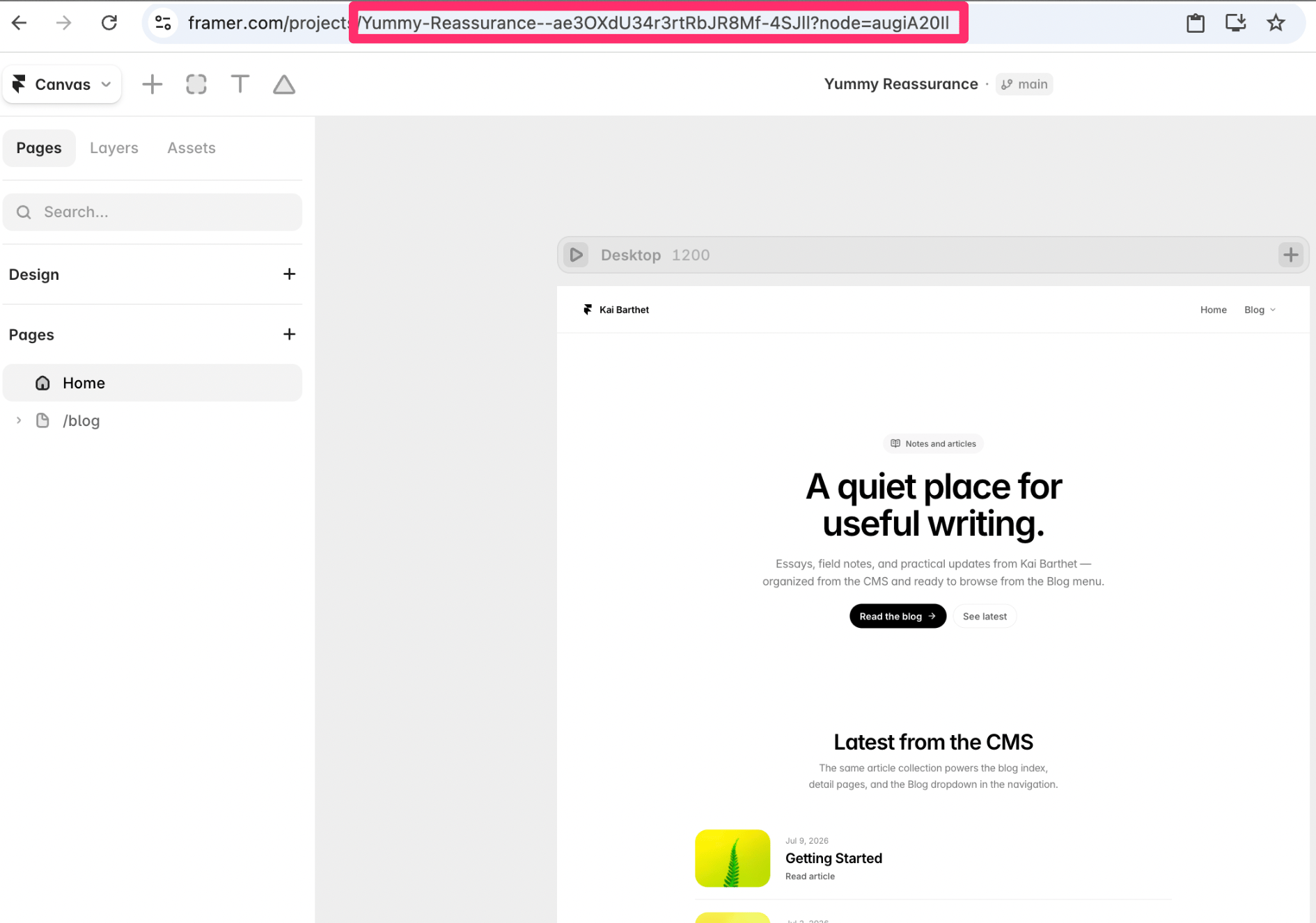 In this case the Project ID is: **Yummy-Reassurance--ae3OXdU34r3rtRbJR8Mf-4SJll?node=augiA20Il**
**Add your Collection ID:**
1. Open your project in framer
2. Switch to CMS in the "Canvas" dropdown
3. Click on the CMS collection you would like your Serpy posts to be published to
4. Copy the string/text in the url that comes after "node="
In this case the Collection ID is: **sRz\_r5Stg**
**Add your API Key:**
1. Open your website in framer
2. Navigate to the Canvas dropdown
3. Open settings from the Canvas dropdown
4. Scroll down to API Keys (Beta)
5. Add a new API key (use whatever name you would like)
6. Copy the API key
Once you have entered the three required fields, press test connection and ensure you receive the connection successful message.
## Tips for Framer
Make sure you are connecting the correct Framer project.
Check that the publishing destination is set up for articles or blog content.
Review formatting after publishing.
In this case the Project ID is: **Yummy-Reassurance--ae3OXdU34r3rtRbJR8Mf-4SJll?node=augiA20Il**
**Add your Collection ID:**
1. Open your project in framer
2. Switch to CMS in the "Canvas" dropdown
3. Click on the CMS collection you would like your Serpy posts to be published to
4. Copy the string/text in the url that comes after "node="
In this case the Collection ID is: **sRz\_r5Stg**
**Add your API Key:**
1. Open your website in framer
2. Navigate to the Canvas dropdown
3. Open settings from the Canvas dropdown
4. Scroll down to API Keys (Beta)
5. Add a new API key (use whatever name you would like)
6. Copy the API key
Once you have entered the three required fields, press test connection and ensure you receive the connection successful message.
## Tips for Framer
Make sure you are connecting the correct Framer project.
Check that the publishing destination is set up for articles or blog content.
Review formatting after publishing.